Workstation Ergonomics and Eyesight: a Trading Desk That Doesn't Wear You Out
Fundamentals #8. You spend more time at your desk than anywhere else except your bed. Badly placed monitors, a poor chair and bad lighting don't cost you money straight away. They cause fatigue, neck pain and burning eyes in the fourth hour of the session – exactly when the market often makes the last important moves of the day.
Monitors
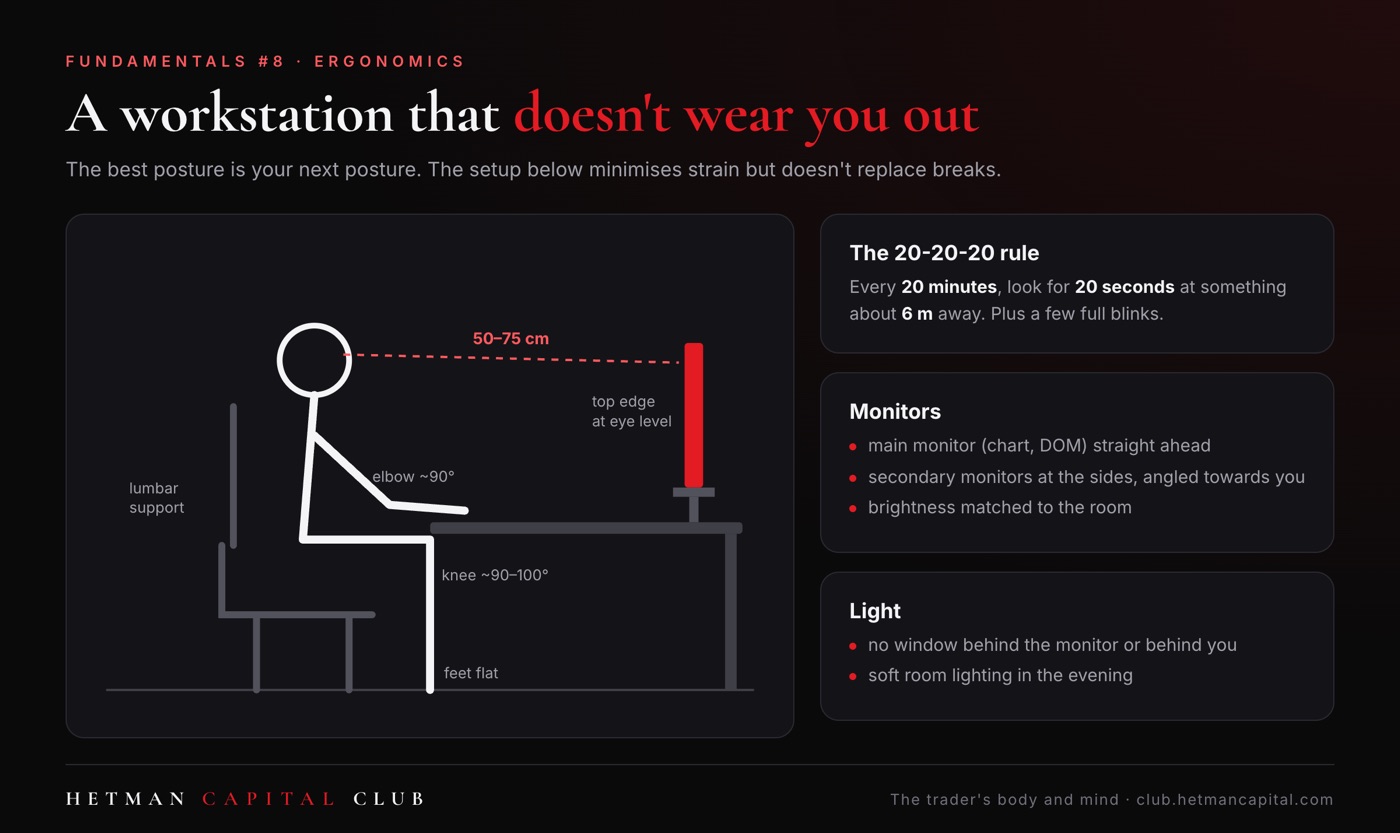
- Distance: roughly an arm's length, usually 50–75 cm (20–30 in). A little further for large monitors.
- Height: the top edge of the screen at eye level or slightly below. Your gaze naturally points slightly downwards.
- Main monitor straight ahead: the one you look at most (your execution chart, the DOM) sits in the centre. Secondary monitors go to the sides, angled slightly towards you.
- No constant head-turning: if you twist your neck sharply several times a minute, change the layout. The most important information should be closest to the centre of your field of view.
- Brightness matched to the room: the screen should not be noticeably brighter than its surroundings.
Chair and posture
- Feet flat on the floor or on a footrest.
- Hips slightly higher than knees.
- Back supported, including the lower back.
- Elbows close to the body, bent at about 90 degrees, forearms resting comfortably on the desk or armrests.
- Keyboard and mouse close to the edge of the desk so you don't have to reach forward.
The best posture is your next posture. Even a perfect setup becomes tiring if you hold it for hours without moving (see Fundamentals #4).
Eyesight
When you work at a screen, your blink rate drops markedly, which dries out the surface of the eye. A review by Sheppard and Wolffsohn (2018) describes digital eye strain as very common among people who spend many hours in front of a monitor: burning, dryness, blurred vision and headaches.
- The 20-20-20 rule (recommended by the American Academy of Ophthalmology): every 20 minutes, look at something about 20 feet (6 metres) away for 20 seconds, ideally out of a window.
- Conscious blinking: a few full, slow blinks at every micro-break.
- Light: avoid having a window directly behind the monitor or behind you (glare). In the evening, switch on soft room lighting instead of working by the light of the screens alone.
- Blue-light glasses: a Cochrane review (Singh et al., 2023) found no convincing evidence that they reduce eye strain. You are better off investing in breaks and good lighting.
- Regular eye tests: even a small uncorrected vision problem increases fatigue during hours of screen work. Have your eyes checked every 1–2 years.
Surroundings
- A temperature of about 20–22°C (68–72°F) and a well-ventilated room. Stuffy air makes you drowsy.
- Phone out of sight, notifications muted.
- A tidy desk: the printed session plan, your journal, water. Nothing else.
This week's protocol
Take a side-on photo of yourself at your desk during a session. Compare it with the list above and fix the one thing that is furthest off. Also use the 20-20-20 rule at every micro-break. Post a before-and-after photo in the comments if you'd like feedback from the community.
Common questions
How many monitors is optimal? As many as you can take in without constantly turning your head. For many traders that means one main monitor and one or two secondary ones. More screens also mean more stimuli and distractions.
Dark mode or light mode? Research gives no clear answer. Matching screen brightness to the room and good text contrast matter more.
Sources
- American Academy of Ophthalmology. Computers, digital devices and eye strain (patient guidance).
- Sheppard A. L., Wolffsohn J. S. (2018). Digital eye strain: prevalence, measurement and amelioration. BMJ Open Ophthalmology.
- Singh S. et al. (2023). Blue-light filtering spectacle lenses for visual performance, sleep, and macular health in adults. Cochrane Database of Systematic Reviews.
Educational content, not medical advice or an investment recommendation. If neck or back pain or vision problems persist, see a doctor or a physiotherapist.